
A multilingual meeting does not always require an interpreter in the room, but it does require more preparation than a meeting conducted in one shared language.
Translation tools can help participants follow the discussion, yet they work better when the agenda is clear, terminology is prepared in advance, and speakers avoid long, complicated sentences. Without that preparation, even accurate translation may arrive too late or lack the context needed to make sense.
For routine business updates, supplier calls, project reviews, and early-stage discussions, a combination of written material and translation technology may be enough. Legal negotiations, medical conversations, regulatory matters, and other high-risk discussions may still require a qualified human interpreter.
Send the Agenda Early
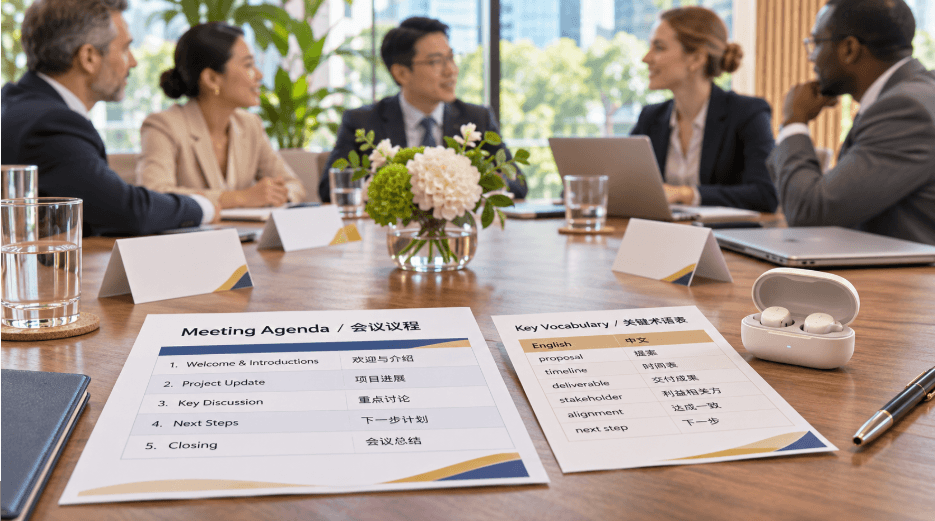
An agenda gives participants time to understand the subject before the meeting begins. Send it in all working languages when possible.
Keep the structure direct. Instead of using a broad topic such as “Project Discussion,” identify the decisions or questions involved:
- Confirm delivery dates
- Review packaging changes
- Resolve two testing issues
- Assign responsibility for the next sample
- Agree on the next review date
Include the names and roles of participants. This helps people recognize who is responsible for technical, commercial, or operational questions.
Supporting documents should follow the same order as the agenda. Number the pages or sections so everyone can locate the same information quickly, even if the translated versions use different layouts.
Prepare the Vocabulary That Matters
General translation may handle everyday business language well, but company names, product codes, abbreviations, and technical terms can cause confusion.
Create a short glossary before the meeting. It may include:
- Product and model names
- Department names
- Industry terminology
- Material specifications
- Common abbreviations
- Names of people and locations
- Terms that should remain untranslated
Share the glossary with participants and enter relevant terms into the translation system if that option is available.
Do not turn the glossary into a full dictionary. Focus on words likely to affect the outcome. A mistranslated greeting is inconvenient; a mistranslated material grade, delivery date, or contract term can change a decision.
Choose a Translation Method for the Meeting Format
The right tool depends on the number of people and how they will interact.
For a one-to-one conversation, real-time translation earbuds can support a more natural exchange because participants do not have to keep passing a handheld device across the table. They are useful when the discussion is long enough for both people to become comfortable with the equipment.
A shared screen or conference platform may work better for a larger group. Captions allow several participants to follow the same translated text without wearing or sharing hardware.
In a hybrid meeting, remote and in-room participants may need different arrangements. A microphone near the conference-room speaker may not capture people sitting several seats away. Test the entire setup from the remote participant’s perspective rather than assuming that clear room audio will also sound clear online.
Test the Actual Language Pair
A general equipment check is not enough. Test the languages and terminology that will be used in the meeting.
Ask two colleagues to read several realistic sentences from the agenda. Include product names, numbers, dates, and one or two technical terms. Check whether the translated result keeps the intended meaning.
Test both directions. A system may handle one speaker’s language or accent differently from the other’s.
Internet access should also be checked in the meeting room. If some functions depend on a network connection, confirm that guest Wi-Fi, firewalls, or login pages will not interrupt them. Download offline language resources in advance when supported.
Keep a backup method available. This may be a shared text document, a written glossary, or a messaging channel where participants can type a sentence that was not understood.
Make the Room Easier to Hear
Translation begins with clear audio. A device cannot process speech that the microphone barely captures.
Place microphones away from ventilation systems, projectors, laptops, and other steady noise sources. In a long conference room, one microphone at the far end may not capture everyone equally.
Ask participants to speak one at a time and face the microphone. Side conversations are especially difficult because the translation system may mix them with the main speaker.
Name cards can help when participants have not met before. If people introduce themselves clearly at the beginning, it becomes easier to understand who is speaking and which area of the project they represent.
Speak for Meaning, Not Speed
Long sentences containing several conditions are difficult to translate and harder for listeners to remember. Break them into separate points.
Instead of saying:
“We can approve the new schedule if the final sample arrives by Thursday, provided that the packaging test has already passed and the revised cost remains within the previous estimate.”
Use three statements:
“The final sample must arrive by Thursday.”
“The packaging test must be complete.”
“The revised cost must stay within the previous estimate.”
Pause after each idea. This gives the translation time to finish and allows participants to ask about one point before the conversation moves on.
Avoid jokes, unexplained idioms, and local expressions when clarity matters. “We need to hit the ground running” may be familiar to one group and confusing to another. “We need to begin work immediately” is easier to translate.
Put Important Numbers on Screen
Dates, prices, quantities, measurements, and model numbers should be visible in writing.
When someone says “fifteen,” another participant may hear “fifty,” especially through a remote connection. Displaying “15 units” removes the uncertainty.
Use a consistent date format. “6/7/2026” may mean June 7 or July 6, depending on the reader. Writing “7 June 2026” is clearer.
Currencies and measurement units should also be stated. A price without a currency or a dimension without a unit invites mistakes that may not be noticed during the meeting.
Keep a Shared Record
Translated captions are useful during the conversation, but they are not always suitable as final minutes. Names, technical language, and overlapping speech may still need correction.
A note tablet with live transcription can help capture the discussion while the meeting leader separately marks decisions, open questions, and assigned tasks. The transcript provides context; the written notes identify what the group actually agreed to do.
Use a visible action list during the meeting. Each item should include an owner and deadline. Participants can then confirm the details before the conversation moves on.
Do not wait until the end to resolve every unclear point. If a translated statement affects a decision, repeat it in simpler language and ask the speaker to confirm the meaning.
Leave Time for a Final Check
Reserve the last few minutes for decisions and next steps. Read each item slowly and display it in writing.
Confirm:
- What was approved
- What remains unresolved
- Who owns each task
- The expected result
- The deadline
- The date of the next review
Ask participants to correct the record before the meeting closes. Silence does not always mean agreement; someone may still be reading the translated text or deciding how to explain a concern.
Send a Written Follow-Up
The follow-up message should be shorter than the transcript. Include confirmed decisions, action items, unresolved questions, and the next meeting date.
Send translated versions when possible, but keep key numbers and product terms consistent across every copy. If an automatic translation is used, review the sections that affect cost, timing, specifications, or responsibility.
Ask recipients to report corrections within a clear period. A written confirmation gives the group a shared reference and prevents the next meeting from beginning with a debate about what was decided previously.
Translation technology can keep a multilingual meeting moving. Preparation keeps it from moving in the wrong direction.